Headless mode
Next.js reads the content. WordPress stays private
Headless mode is a plugin feature available from the Team plan. A Next.js front end on Vercel reads content through one controlled channel. WordPress is not open to the public internet, and editors keep publishing from the admin as usual.
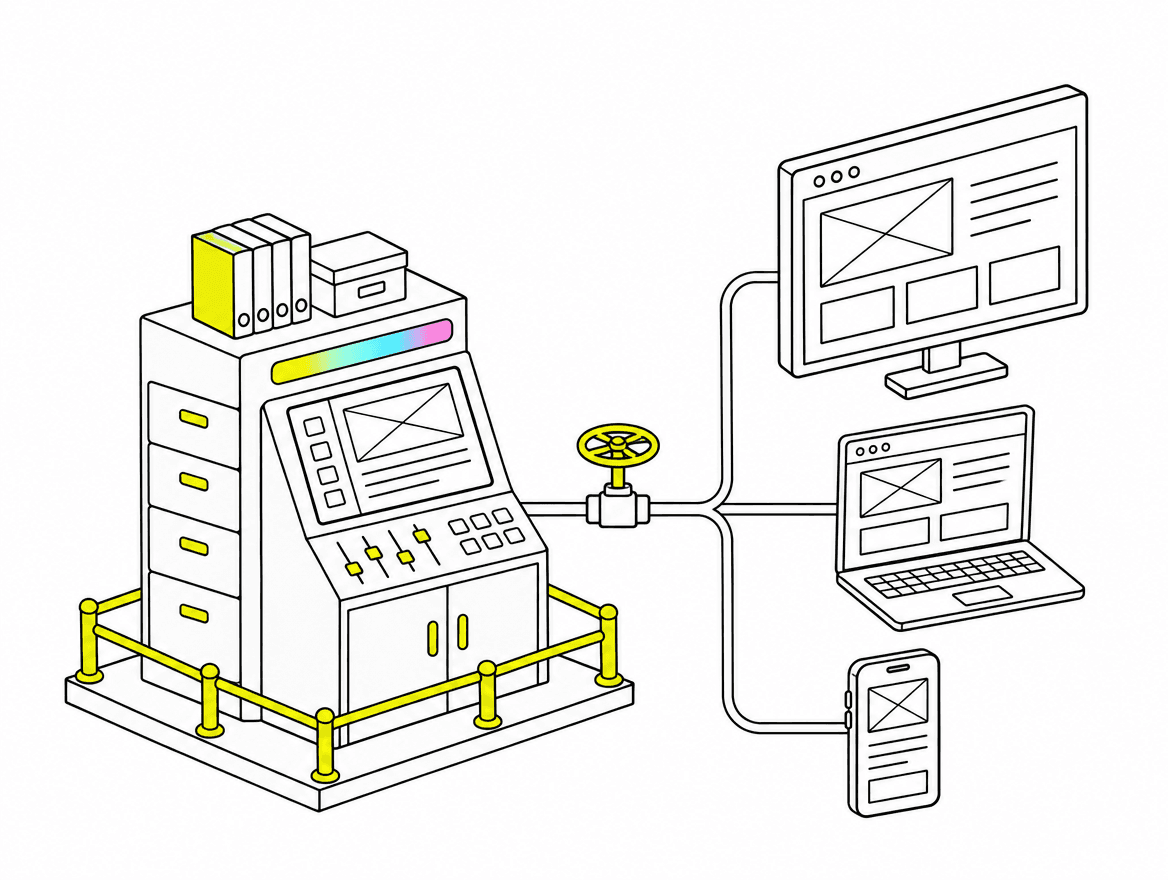
What the plugin provides
Three parts from the plugin. Your team builds the front end
Visitors reach the Next.js front end on Vercel. The front end fetches from WordPress in the private network, through the controlled channel, only when it needs content. Your own engineering team or a partner builds the front end.
- Private zone
WordPress
On the private network, used only as the content source
- Controlled channel
Controlled channel
Only requests carrying the service token get through
- Public zone
Next.js front end
Deployed on Vercel, updated per page
- Public internet
Visitors
Can reach only the front end
One controlled content channel
The front end fetches content through this channel only, and each request must carry a service token. Requests without the token do not reach the WordPress API.
Per-page update notifications
When content changes, the plugin tells the front end to regenerate the affected page. Editing one post does not trigger a full-site rebuild.
Next.js starter project
A project template with the content channel and update notifications already connected. Copy it into your Git repository and start building from there.
When you need it
Four cases where static files fall short
Static output is simpler and comes with every plan, so check first whether it meets your needs. You need Headless mode only in the cases below.
Visitor login and memberships
Member areas, subscriber content and pages that vary by identity have to work out who the visitor is at request time.
Cart and checkout
Stock, prices and order status change constantly, so checkout has to fetch live data from the store's API.
Very large or frequently updated content
When there are too many pages for a full-site export to finish in reasonable time, or you publish many items a day, per-page updates are more practical than batch export.
Personalized content
Showing different content by region, language preference or browsing history means the front end has to assemble the page on the server.
Starter project
What the starter connects, and what you build
The starter project handles the connection between the front end and WordPress. The UI and interactive features differ on every site, so your team builds them.
In the starter
Content fetching
Code that fetches posts, pages and categories through the controlled channel. The service token is read from an environment variable.
In the starter
Update notification endpoint
Regenerates the matching page when the plugin's notification arrives.
In the starter
Draft preview
Makes the Preview button in the admin open the draft in the front end.
In the starter
Basic page examples
One example each for a post, a page and a listing, showing how to connect content to the UI.
You build
Design and layout
The existing theme does not carry over. Your team builds the layout, components and styles in Next.js.
You build
Commerce integration
Products, cart and checkout connect through the store's API. The front end never touches the store's database directly.
You build
Search
Site search needs a search service or an index you build yourself. Your team decides which.
You build
Forms
Form submissions go through an API. Input validation, abuse prevention and notification emails each have to be built and tested.
Limits
A Headless front end has code to patch too
A Headless front end runs code on the server, and that code and its dependencies can have vulnerabilities like any other. On 2025-12-03 React disclosed CVE-2025-55182 in React Server Components, an unauthenticated remote code execution vulnerability rated CVSS 10.0.React, 2025-12-03
Pure static output does not run this kind of code. When the site's requirements allow it, static output is the simpler choice, and only the parts that need interaction go to Headless mode.
Updating dependencies is your job. The front end lives in your Git repository, and when Next.js and React ship security updates, your team has to upgrade and redeploy. Updating WordPress plugins does not touch the front end's dependencies.
What you still have to look after
- Plugins on the origin still need updates, though an attacker has to pass access verification first
- Keep the service token and the Git, Vercel and DNS credentials secure, and rotate them regularly
- Once forms, search and memberships become APIs, they are new attack surface and need their own testing
Launch steps
Six steps, each with a pass condition
Your team works through them in order. If a step's condition is not met, do not start the next one.
- 01
Inventory
List page types, plugins, dynamic features and third-party scripts. Mark which ones need rebuilding and which can be dropped.
Pass conditionEvery feature has a replacement and an owner.
- 02
Content model
Sort out post types, fields and taxonomies, and define which data the front end fetches from WordPress.
Pass conditionEvery field the front end needs can be fetched through the controlled channel.
- 03
Build the front end
Start from the starter project and build the pages in Next.js. Connect preview, search, forms and the store's API.
Pass conditionEvery page type displays and works correctly in the preview environment.
- 04
Parallel acceptance
Run the new front end alongside the existing site and compare content, URLs, redirects and structured data page by page.
Pass conditionEvery entry in the URL map responds correctly, and forms and checkout have been run through end to end.
- 05
Cutover
Point DNS to Vercel, move WordPress into the private network and close its public entry points.
Pass conditionThe admin login page and the WordPress API are unreachable from the public internet, and the rollback procedure has been drilled once.
- 06
Day-to-day operations
Keep updating the front end's dependencies and the origin's plugins, and run rollback drills on a schedule.
Pass conditionEvery update is logged, and the result of each rollback drill is written up in a report.
FAQ
Common questions before you turn it on
Team and Enterprise. Community and Pro provide static output and do not include Headless mode. The pricing page lists the differences between plans and their prices.
No. Editors sign in to the same WordPress admin and publish with the same editor. Two things change: they pass the company's access verification before signing in, and previews show the new front end.
Not in Headless mode. The front end is built separately in Next.js, and the existing theme no longer renders pages. To keep the layouts made with your theme and page builder, use static output.
Pages that are already published keep being served to visitors. New pages and pages that need regenerating update only after WordPress is back.
You do. Once copied, the starter project lives in your own Git repository, and so does the front-end code you write afterward. If you change teams one day, you hand over the repository.
A partner of yours can build the front end. The Enterprise plan offers optional onboarding assistance as an add-on, provided by Tenten or a partner.

Take WordPress off the public internet
Leave your email and we will tell you when the paid plans open. The free edition will be published on GitHub and needs no license key.
Joining the early access list is free.